Godot 3.2.3 Grid Movement Part 2/2

I converted this Godot Grid Movement Video Tutorial into textual tutorial because I feel it is much easier to follow textual tutorial.

This is Part 2, you can view Part 1 here.

What You Will Learn From This Godot Grid Movement Tutorial

  1. How to create player sprite that move in 2D grid
  2. Create Collision walls where the player sprite cannot pass through the wall

Part 2 – Player Sprite Moves within Walls

Create Walls

i. Add child node -> Add TileMap.
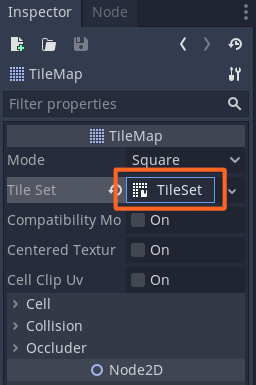
ii. Set Tile Set from empty to new Tile Set.
iii. Double click on new Tile Set to change to Resource tab.
iv. Click “+” add texture (add bottom left)
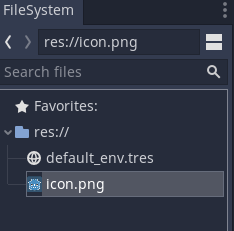
v. Use the default Godot icon as the wall.
vi. Make the Icon editor window bigger by clicking on the up arrow (bottom right)
vii. Zoom in the tile set by clicking “+” at top right.
viii. Click “New Single Tile” and click grid icon to enable the grid.
ix. Select the icon if selected yellow line will appear.
x. Change color to black by clicking the “Modulate”
xi. Change RGB color to 000000

godot grid movement - create tilemap
godot grid movement – create tilemap
godot grid movement - set tile set to new tile set
godot grid movement – set tile set to new tile set
godot grid movement - double click on new tile set to set the resources
godot grid movement – double click on new tile set to set the resources
godot grid movement - add the resource
godot grid movement – add the resource
godot grid movement - use default godot icon
godot grid movement – use default godot icon
godot grid movement - click up arrow bottom rigth to make the icon editor bigger
godot grid movement – click up arrow bottom rigth to make the icon editor bigger
godot grid movement - zoom in the icon
godot grid movement – zoom in the icon
godot grid movement - click new single tile and enable the grid
godot grid movement – click new single tile and enable the grid
godot grid movement - grid enabled
godot grid movement – grid enabled
godot grid movement - change color by clicking on modulate
godot grid movement – change color by clicking on modulate
godot grid movement - change color to black where RGB 000000
godot grid movement – change color to black where RGB 000000

Add Collision to The Wall Tile Set

i. Ensure tile set is still selected (yellow outline)
ii.Click “Collision”
iii. Click the square icon
iv. The select the region within the yellow line.
v. Icon color will change to turquoise if collision is properly set.

godot grid movement - add collision square
godot grid movement – add collision square

Create The Maze

i. Click on player sprite (to go back to player scene)
ii. You will see the TileMap is black now.
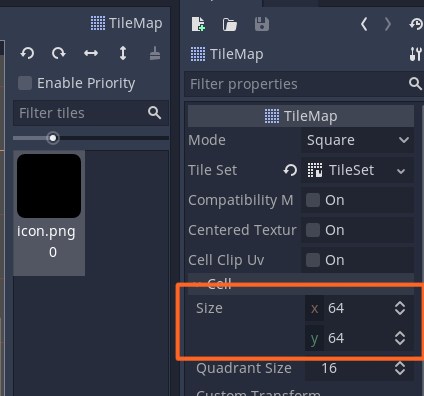
iii. Check the TileMap is 64×64
iv. Click on TileMap and start populating the walls to create your own maze.

godot grid movement - wall is black
godot grid movement – wall is black
godot grid movement - ensure size is 64x64
godot grid movement – ensure size is 64×64
godot grid movement - create maze
godot grid movement – create maze

Add RayCast2D to Player Sprite

i. Right click on Player sprite -> Add child node
ii. Select RayCast2D
iii. Set the RayCast2D
– Position x = 32, y = 32 (to make centre (red plus sign))
– Enable is on
– Cast to y = 32 (to make the down blue arrow to just at the edge of the player sprite)

godot grid movement - create raycast2D
godot grid movement – create raycast2D
godot grid movement - set the raycast2D
godot grid movement – set the raycast2D

Update the Player Script

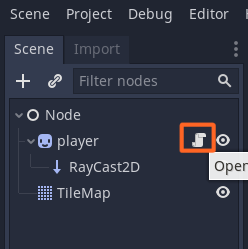
i. Click on the script icon near Player sprite
ii. Update the script based on the code below.
iii. Ensure script indentation is correct.

godot grid movement - open script
godot grid movement – open script

godot grid movemen t- update script with raycast2d p1

godot grid movemen t- update script with raycast2d p2

Run The Game

i. Click Play icon (top right)
ii. Now you can see the player sprite can’t pass through the walls.

Godot 3.2.3 Grid Movement Part 1/2

I converted this Godot Grid Movement Video Tutorial into textual tutorial because I feel it is much easier to follow textual tutorial.

What You Will Learn From This Godot Grid Movement Tutorial

  1. How to create player sprite that move in 2D grid
  2. Create Collision walls where the player sprite cannot pass through the wall

Part 1 – Make the Sprite Move

Create Node

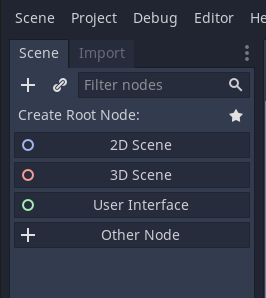
i. Click “Other Node”
ii. Then select “Node”

godot grid movement - create node
godot grid movement – create node
godot grid movement - select node
godot grid movement – select node

Create Sprite

i. Right click “Node” -> Add child node
ii. Select Sprite
iii. Drag and drop icon.png into sprite texture at right panel
iv. At sprite panel, untick centered on
v. Click “Scene” (top menu left) then save scene as player.

godot grid movement - create sprite
godot grid movement – create sprite
godot gride movement - drag n drop icon to sprite texture
godot gride movement – drag n drop icon to sprite texture
godot grid movement - untick centered
godot grid movement – untick centered
godot grid movement - save scene as player
godot grid movement – save scene as player

Add Script to the Player sprite

i. Right click on Sprite -> Attach Script
ii. Click create on when the window open.
iii. Remove all codes except “extends Sprite”
iv. Copy the code below and paste to the script. Ensure indentation is correct.

godot grid movement - attach script
godot grid movement – attach script
godot grid movement - create script
godot grid movement – create script

godot grid movement - remove all codes except extends Sprite
godot grid movement – remove all codes except extends Sprite

godot grid movement - script part 1
godot grid movement – script part 1

godot grid movement - script part 2
godot grid movement – script part 2

Run the Scene

i. Click “Play” (top right) or F5 to run the scene.
ii. Move your arrow left, right, up and down to move the player sprite.

Part 2 Godot Grid Movement Tutorial – Make The Collision Wall and Combined with Player Sprite

Unifi Mesh Wifi M4 TP Link Set Up

I took the Unifi Mesh Wifi package of RM15 per month for 24 months. It was quite easy to set up just need to install mobile application Deco then follow its step by step instruction.

You can refer this document by TP Link to understand how to set it up.

I only include part not covers by the document which is the button to add new Wifi network. You just need to click on the “+” on right top.

TP Link Mesh Wifi Deco App - add new mesh
TP Link Mesh Wifi Deco App – add new mesh

Then you can follow the step by step instruction.

Below is example of pulsing blue.


Resipi Ayam atau Mutton Stuffing for Taco, Wraps or Burritos


Tortillas Wrap
Tortillas Wrap

Bahan – Bahan:

  1.  Bawang besar (potong dadu)
  2. Bawang putih (mayang halus)
  3. cili blend / cili boh
  4. rempah kari + serbuk cili + air (mix)
  5. jintan putih
  6. Serbuk ketumbar
  7. parsley herb
  8. white pepper + salt
  9. perasa: sos tomato, sos cili, kicap and tiram.
  10. Minced mutton atau ayam cincang.


Herbs - parsley, cumin, coriander
Herbs – parsley, cumin, coriander

Tumis macam biasa bahan-bahan di atas mengikut turutan nombor dimana akhir sekali adalah meletakkan ayam atau mutton minced sehingga bahan utama protein tersebut masak secukupnya.

Side filling / toppings

Preparation for Taco fillings
  1. capsicum
  2. japanese cucumber
  3. carrot
  4. shredded cheese
  5. lettuce
  6. rocket leaf
  7. Baby tomato
  8. Thousand island sauce
  9. Honey Mustard

(you can choose to slice match size or any size you prefer)

preheat Taco shells in oven
Baked shredded cheese till melt before putting veggies

you can choose any type of – WRAPS/ BURRITO / TORTILLAS / CORN WRAPS (TACO) mengikut selera. Since my youngest son been dreaming eating TACO… so i made few options because my 2nd son prefer to eat Burritos.


Readymade Taco Shells

Lain orang lain kesukaan tetapi yang penting you can just made one time cook for the same fillings.

Chicken and Mutton Burritos


buritos kambing
buritos kambing

Apple Macbook Pro M1 chip Fail to Play My iPhone Games Doorman Story

I bought an Apple Macbook Pro M1 in 2nd week of December, 202o. I was excited because know it can play iPad or iPhone games thanks to M1 chip which is similar like iPhone and iPad ARM chip.

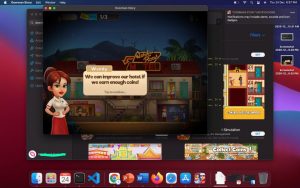
At first after downloading my favorite game Doorman Story, I could play it.

apple macbook pro M1 downloaded iphone game
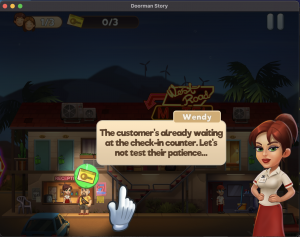
apple macbook pro M1 - crash while playing iphone game
apple macbook pro M1 – crash while playing iphone game

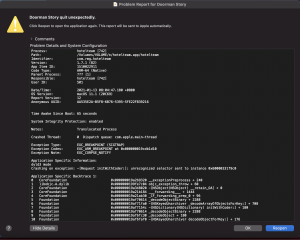
When I wanted to play second time, it produced error as shown in the image. Second time here means, I switched off my Macbook Pro then on it again.

apple macbook pro M1 error in playing iphone games

It is really frustrating as the game won’t load even after few on and off the MacBook. Even after re-installing it doesn’t work.  I haven’t try other iPad or iPhone app though.

Install Signal Messaging Desktop on Ubuntu

Every knows that WhatsApp changes its End Users License Agreement (EULA) . Lots of people are worried about data privacy.

That is why I’m migrating to Signal Messaging. I installed Signal Desktop on Ubuntu but I faced small hiccup which I shared how to solve it.

Download Signal for desktop

Download it here: https://signal.org/en/download/#

and follow the given  instructions.

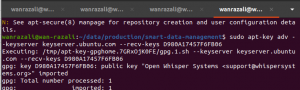
Can get the signing key from the error messageInstall Signal official public software signing key

signal desktop install ubuntu - signing key
signal desktop install ubuntu – signing key

Add Signal repository to your list of repositories

Update Ubuntu package database and install signal

signal desktop installation ubuntu - error during installation
signal desktop installation ubuntu – error during installation

If Installation error like me, add the signing key

Can get the signing key from the error message

signal desktop install on ubuntu getting the signing key

Then run the command

signal desktop installation ubuntu - add key
signal desktop installation ubuntu – add key

Reinstall again after adding the signing key

signal desktop installation ubuntu successful


Reference:

Fix apt-get update “the following signatures couldn’t be verified because the public key is not available”

Register Seda Save 2.0 Program via Shopee Mobile Application

SEDA under Save 2.0 Program is giving away RM200 voucher to buy 5 star energy rated aircond and fridge. You can use the voucher via Shopee.

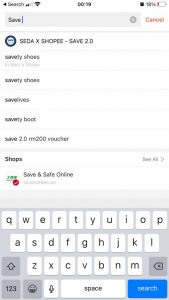
Search Seda Save 2.0 by Typing Save in Shopee App

seda save 2.0 search at shopee app

Fill in the Required Information

Click on Daftar Sekarang

Click on Daftar Sekarang


Click on Daftar Sekarang

seda save 2.0 voucher rm200 for fridge and aircond 5 stars energy

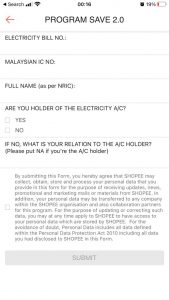
Fill in the Required Information


Fill in the Required Information

shopee seda save 2.0 registration form

Even if you check YES, ensure you fill in the relation of Account Holder. If not the Submission Button is not activated

shopee seda save 2.0 fill in the reason to submit

If Everything OK, you will see the Complete Registration Page

seda save 2.0 shopee program save 2.0 submission

Google Adsense How to Verify PIN Address

Suddenly when I logged into my Google Adsense account, Google asked me to verify my address before they can proceed any payment.

I was looking where to do it and what address I used but it is really hard to find the manual.

So I do this article with screenshots so easy for others to find and do it.

1. Verify Your PIN Address

If you have this message, then you have to verify your address.

i. Go to you dashboard @ Home

google adsense home dashboard

ii. Scroll Down till you find “Todo – Verify your Billing Address”

google adsense verify address

iii. If you already receive your PIN, you can key in the 6 digits by clicking verify.

2. Where To Know What is Your Billing Address

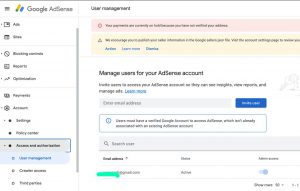
i. Check your primary user first because Google will send to primary user. (Click Account > Access & Authorization > User Management)

google adsense - user management
google adsense – user management

ii. Click on your profile on top right and click my account

google account - manage account
google account – manage account

iii. Click Payment & Subscriptions > Manage payment methods

google account - payment and subscriptions
google account – payment and subscriptions

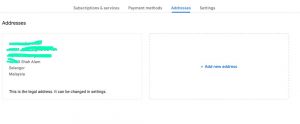
iv. Click Address

google account - manage address
google account – manage address

Happy New Year 2021 From Genting Highlands view from Windmill Upon Hills

Happy New Year 2021! This year, unfortunately no fireworks. But it has beautiful thick fogs surrounding Windmill Upon Hills at Genting Sempah.

At new year eve, at first you can see Geo 38 Residence but around 930PM the fog became very thick and couldn’t view Geo 38. This happens even till morning of 1st Jan 2021.

new year 2021 eve fog around 9pm
new year 2021 eve, fog around 9pm
new year 2021 eve thick fog around 9pm
new year 2021 eve, thick fog around 930pm